
Weighted Grade Calculator (Calculate Your Final Grade Instantly)

Quickly calculate your weighted grade and know exactly where you stand before your final exam.
This free weighted grade calculator helps students find their final course grade using assignment, quiz, and exam weights — instantly and accurately.
 
✔ Instant results
✔ No signup required
✔ 100% free to use
✔ Based on standard academic grading formulas used in schools and universities
Know how each assignment, quiz, or exam affects your final grade — and make smarter academic decisions in seconds.

🟦 Key Features of This Calculator

  • 🧮 Supports multiple grade components (assignments, quizzes, exams)

  • ⚡ Quick & advanced modes for simple or detailed calculations

  • 📊 Real-time accurate weighted grade results

  • ➗ Automatically handles weights and percentage conversions

  • 📋 Detailed breakdown of each component’s contribution

  • 📉 Visual grade scale (A–F) for easy understanding

  • 🎯 What-if simulator to test different score scenarios

  • 🔮 Grade projection based on remaining work

  • 💡 Smart insights to highlight weak and strong areas

  • ⚠️ Alerts if total weight is not equal to 100%

  • 📱 Fully mobile-friendly and responsive design

  • 📤 Export results (CSV) & easy share option

  • 🔒 100% private — all calculations run in your browser

👉 Simple, fast, and designed to help you improve your final grade with clarity and control.

Saved
Quick Mode

Enter your current standing for an instant grade estimate.

Your grade so far on completed work (%)
%
% of grade already graded
%
% of grade still remaining
%
What final grade are you aiming for?
%
Results
85.0%
Good
B
0% 85.0% 100%
D 60C 70B 80A 90
Visualization
Component Contributions
Grade Projection (remaining score)
What-If Simulator
Projected Final Grade
85.0% — B
Preset Scenarios
Adjust Scores
Smart Insights

All calculations run locally in your browser — no data is sent anywhere.

Current Grade
85.0%
B

Reset calculator?

This clears all your data and restores the defaults. This cannot be undone.

🟦 How to Use This Calculator (Step-by-Step Guide)

👉 You can calculate your grade in less than 30 seconds by following these simple steps:

🟢 Step 1: Open the Calculator & Select “Advanced Mode”

Weighted grade calculator advanced mode interface showing multiple components for grade calculation

Start by opening the calculator and switching to Advanced Mode.
This allows you to add multiple components like midterm, quizzes, and assignments.

💡 Pro Tip:
Advanced mode gives you full control over each grade component, which improves accuracy for weighted grade calculation.

🟢 Step 2: Enter Your First Component (Midterm or Assignment)
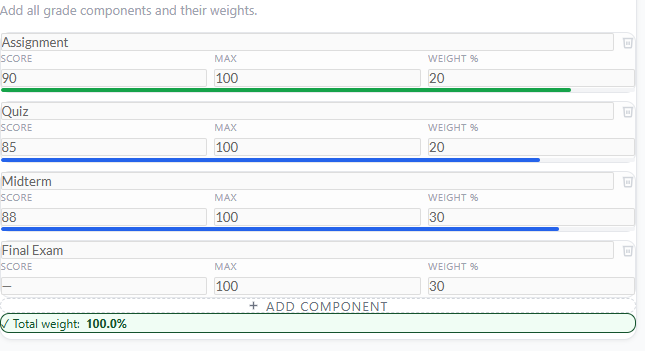
Entering midterm score, maximum marks, and weight percentage in weighted grade calculator

Now add your first grade component (for example: Midterm).
Enter:

  • Score (e.g., 88)
  • Maximum marks (e.g., 100)
  • Weight percentage (e.g., 30%)

💡 Pro Tip:
Always start with your highest-weight component first — it helps you understand its impact on your final grade early.

🟢 Step 3: Add Additional Components

Adding multiple grade components such as assignments and quizzes in weighted grade calculator

Click “Add Component” and include remaining items like quizzes, assignments, or exams.

💡 Pro Tip:
Make sure every component has correct weight distribution to avoid incorrect final grade calculation.

🟢 Step 4: Check Total Weight Indicator

Checking total weight percentage in weighted grade calculator to ensure accurate results

Look at the Total Weight section (e.g., 30% / 100%).
This tells you whether your grading structure is complete.

💡 Pro Tip:
If total weight is not 100%, adjust components — otherwise results may be inaccurate.

🟢 Step 5: Click Calculate / View Results
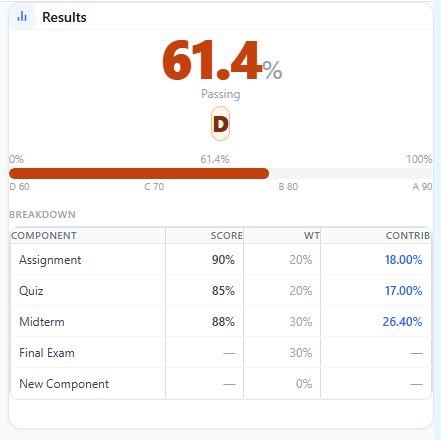
Final weighted grade result showing percentage score letter grade and component breakdown

Now check your instant results panel showing:

  • Final grade percentage
  • Letter grade (A–F)
  • Component breakdown

💡 Pro Tip:
Use the breakdown to see which component is improving or lowering your grade.

🟢 Step 6: Use What-If Simulator (Optional but Powerful)
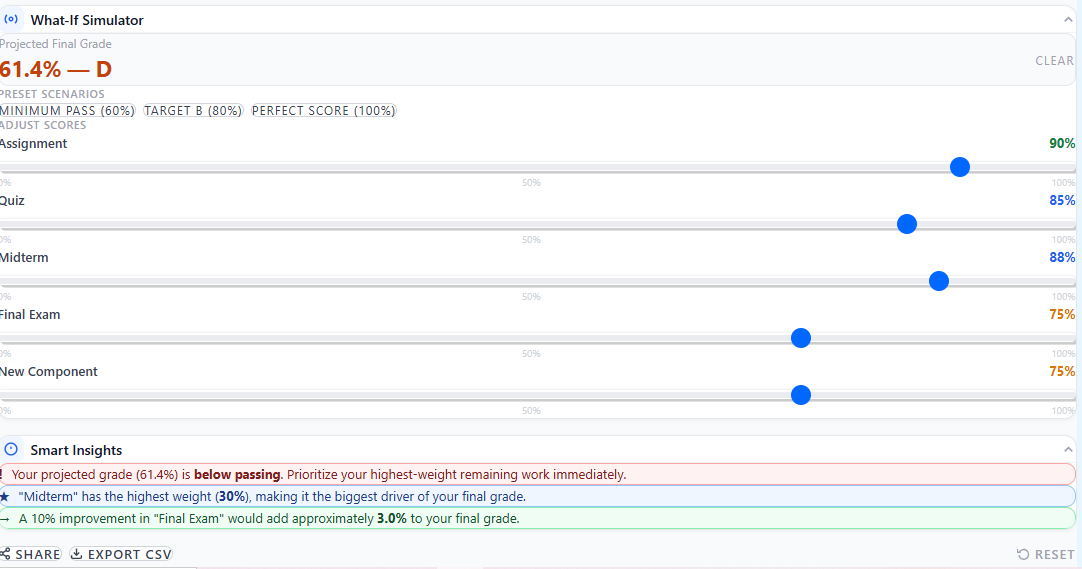
What-if simulator in weighted grade calculator showing projected final grade based on different scores

Test different score scenarios using sliders (e.g., increase midterm score).

💡 Pro Tip:
This helps you plan better for exams and understand how small changes affect your final grade percentage.

🟦 What Is a Weighted Grade Calculator?

A weighted grade calculator is a tool that helps you calculate your final grade percentage by considering the importance (weight) of each assignment, quiz, or exam. Instead of using a simple average where all scores are treated equally, it calculates a weighted average grade, meaning higher-value components like final exams have a bigger impact on your result.
 
This type of course grade calculation is widely used in schools, colleges, and online courses where different assessments contribute differently to the final score. For example, a final exam might be worth 50%, while assignments and quizzes make up the rest.
 
Using a weighted grade calculator ensures accurate final grade calculation, especially when dealing with multiple components and varying weights. It helps students clearly understand their academic performance and make better decisions before exams or final submissions.

🟦 Weighted Grade Formula

A weighted grade is calculated by multiplying each score by its assigned weight and summing the results. This ensures that more important components—like final exams—have a greater impact on your overall grade.
👉 Important:
Weights are usually given as percentages, but for calculation, they should be converted into decimals. For example, 20% becomes 0.20.
 
Final Grade = (Score×Weight) + (Score×Weight) +
 

🔹 Quick Example

If your score is 80% and its weight is 20%, convert the weight to a decimal (0.20):
Contribution = 80 × 0.20 = 16%
Apply the formula to each component, then sum all the results to find your final weighted grade.

🟦 Example Calculation (Step-by-Step)

To understand how a weighted grade works in real life, here’s a simple example:

🔹 Given:

  • Assignments: 85% (30%)
  • Quiz: 90% (20%)
  • Final Exam: 80% (50%)

🔹 Step-by-Step Solution:

Convert weights into decimals and multiply each score:
  • Assignments → 85 × 0.30 = 25.5
  • Quiz → 90 × 0.20 = 18
  • Final Exam → 80 × 0.50 = 40

🔹 Final Calculation:

Final Grade = 25.5 + 18 + 40 = 83.5%
This breakdown reveals how each part shapes your final result. With this method (or the calculator above), you can clearly track your progress and discover which areas truly boost your grade.

🟦 How Weighted Grades Affect Your Final Result

Weighted grades determine your final result because each assignment has a different impact on the overall grade.

🔹 Why Weights Matter

In this system, bigger tasks count more for your grade. For example, a final test that counts for 50% of your grade has a much greater impact on your grade than a quiz worth 10%. Knowing the amounts helps you figure out your course grade exactly.

🔹 Impact of the Final Exam

The final test usually matters the most, so even a small change in your score can change your grade a lot. Doing well in big parts can quickly raise your average.

🔹 Effect of Low Scores

A low score in a big part can bring your grade down, even if your other scores are good. But a low score in a small part doesn’t matter much.

🔹 Smart Strategy Tip

To raise your final grade percentage efficiently, concentrate most of your study and preparation on tasks with the highest weights, like midterms and final exams. By putting your effort into these, you maximize results for the time invested.
Understanding how weighted grades work helps you make smarter study decisions and stay in control of your academic performance.

🟦 When to Use This Calculator

Use this weighted grade calculator in the following situations to stay on top of your academic performance:
  • 📅 Final exam planning — understand how much your exam will affect your final grade
  • 📊 Tracking course performance — monitor your progress throughout the semester
  • 🎯 GPA estimation — get a clear idea of your expected academic standing
  • 📈 Understanding grade impact — see how each assignment or test changes your final result

🟦 Common Mistakes When Calculating Grades

Many students make simple errors when calculating their grades, leading to an incorrect understanding of their actual performance.
  • ⚠️ Weights not adding up to 100% — If total weights are incorrect, the final result becomes inaccurate and misleading
  • 🔢 Mixing percentages with decimals — Using 20 instead of 0.20 can completely change the calculation
  • 📉 Ignoring final exam weight — Final exams often carry the highest weight, so ignoring them gives an unrealistic grade
  • 🧮 Using simple average instead of weighted average — Treating all scores equally leads to incorrect results in a weighted system
👉 Avoiding these mistakes ensures a more accurate weighted average grade and helps you correctly understand your final grade percentage.

🟦 Weighted vs Unweighted Grades

Learn the difference between weighted and unweighted grades to accurately interpret your performance.

🔹 Comparison

  • Imagine your grade as a recipe: weighted grades mix in more of what matters. Exams usually pack a bigger punch than assignments, making them crucial to your overall performance.
  • Think of unweighted grades as a simple blend—every ingredient gets equal attention. No matter how tough or important an assignment is, each score counts the same!

🔹 When Each Is Used

Weighted grading is commonly used in schools, colleges, and university courses where different assessments contribute differently to the final result. Unweighted grading is often used in basic or simplified grading systems, where all tasks are treated equally.

🔹 Why Weighted Grades Are More Accurate

Weighted grades paint a truer picture of your progress: they highlight what truly matters and why your best efforts count. That’s why educators often prefer them for your overall course results.
Curious to see how your effort stacks up? Try our Final Grade Calculator and GPA Calculator—they crunch the numbers so you can celebrate your success!

This calculator uses standard academic grading formulas widely used in schools and universities, ensuring accurate and reliable weighted grade calculations.

📌 FAQs (Frequently Asked Questions) :

How accurate is this weighted grade calculator?

This calculator is highly accurate as it uses standard weighted average grade formulas used in schools and universities. Results depend on correct input of scores and weights.

Yes, you can easily include your final exam score with its weight to see how it impacts your overall course grade calculation.

If weights don’t equal 100%, the result may be incomplete or misleading. Always adjust your inputs to total 100% for an accurate final grade percentage.

Yes, it is designed for both school and college students to calculate weighted grades across different subjects and courses.

It can help estimate performance, but GPA systems vary. For precise GPA calculation, use a dedicated GPA calculator.

Multiply each score by its weight (converted into decimal form), then add all results together to get your final weighted grade.

Scroll to Top